 Similar to yesterdays' post, this one is based off the totients of the values in Pascal's triangle.. but this time, we are displaying the Cototients (n - totient(n))...
Showing posts with label Pascal's Triangle. Show all posts
Showing posts with label Pascal's Triangle. Show all posts
16 February 2007
Pascals' Cototients
Similar to yesterdays' post, this one is based off the totients of the values in Pascal's triangle.. but this time, we are displaying the Cototients (n - totient(n))...


15 February 2007
Pascal's Totients
 I was trying to figure out new ways to look at Pascals' Triangle today, and decided to look not at the actual binomial coefficients, but at the Euler Totients of them. Take a gander.
12 February 2007
Pascal and Binomial Coefficients
I realized that I never really showed how Pascal's Triangle is related to the Binomial Coefficients... So here we go:
(x+1)0 =
1

(x+1)1 =
1x + 1 =
1 1

(x+1)2 =
(x+1)(x+1) =
x*x + x*1 + 1*x + 1*1 =
1x2 + 2x + 1 =
1 2 1

(x+1)3 =
(x+1)(x+1)(x+1) =
((x+1)(x+1))(x+1) =
(1x2 + 2x + 1)(x+1) =
(1x2*x + 1x2)+(2x*x + 2x*1)+(1*x + 1*1)=
1x3 + 1x2 + 2x2 + 2x + x + 1 =
1x3 + 3x2 + 3x + 1 =
1 3 3 1


(x+1)4 =
(x+1)(x+1)(x+1)(x+1) =
((x+1)(x+1)(x+1))(x+1) =
(1x3 + 3x2 + 3x + 1)(x+1) =
(1x3*x + 1x3*1)+(3x2*x + 3x2*1)+(3x*x + 3x*1)+(1*x + 1*1) =
1x4 + 1x3 + 3x3 + 3x2 + 3x2 + 3x + 1x + 1 =
1x4 + 4x3 + 6x2 + 4x + 1 =
1 4 6 4 1
07 February 2007
A Modded Pacal Triangle

As you generate very large Pascal Triangles, the numbers quickly get out of control. If you are planning on modding the values after obtaining them, why not mod them first?
Here you see an example of doing a mod5 before writing the number down... So, for example, the middle element on Row#4 is 1 because (3+3)%5 = 6%5 = 1... Now, you can use the number 1 for further rows instead of the original number 6.
06 February 2007
Binary Representation of Pascal's Triangle

To look like this, one thing you might do is work out all the values of the previous lines and then mod them to determine whether they should be highlighted or not.
Yet another way might be to just keep track of whether the values above are 1 or 0, and realize that the next one down is only 0 if both the parent hexes are 1.
But, how about a way to do it without any regard to previous rows? This method is quite simple...
Let's say you want to examine nCr (n=row, r=col)... say, 5C2 (10 if you look at the image)...
How do we do it? First, write down the binary value of n and r.
n (5) = 101
r (2) = 010
Now, if ANY digit in r is larger than the corresponding digit in n, it is even. Otherwise, it is odd.
Looking at our example, we compare:
| bits | |||
|---|---|---|---|
| 2 | 1 | 0 | |
| n | 1 | 0 | 1 |
| r | 0 | 1 | 0 |
| r[1] is higher than n[1] so it is even | |||
So, to determine if any point in Pascals' Triangle is odd/even, you just have to compare the binary representation of the row and column. :)
10 December 2006
Powers of 11 in Pascal's Triangle
 So one of the first things you might recognize are the first few rows... The numbers "feel" familiar...
That could be because they are actually powers of 11...
110 = 1
111 = 11
112 = 121
113 = 1331
114 = 14641
But what is 115? Whoa - hold up. Let's recap just a little...
Let's re-examine 112....
What we are really seeing is:
| 102 | 101 | 100 |
|---|---|---|
| 1 | 2 | 1 |
| Which is really... | ||
| 1 * 102 | 2 * 101 | 1 * 100 |
| 100 | 20 | 1 |
| or... 100+20+1 = 121 = 112 | ||
The same is true for 113...
| 103 | 102 | 101 | 100 |
|---|---|---|---|
| 1 | 3 | 3 | 1 |
| Which is really... | |||
| 1 * 103 | 3 * 102 | 3 * 101 | 1 * 100 |
| 1000 | 300 | 30 | 1 |
| or... 1000+300+30+1 = 1331 = 113 | |||
Now, 115 is a bit more tricky... The math is the exact same, but it is not as visually obvious...
| 105 | 104 | 103 | 102 | 101 | 100 |
|---|---|---|---|---|---|
| 1 | 5 | 10 | 10 | 5 | 1 |
| Which is really... | |||||
| 1 * 105 | 5 * 104 | 10 * 103 | 10 * 102 | 5 * 101 | 1 * 100 |
| 100000 | 50000 | 10000 | 1000 | 50 | 1 |
| or... 100000+50000+10000+1000+50+1 = 161051 = 115 | |||||
08 December 2006
Ian's discovery to get any number in Pascal's Triangle
I always found this interesting... A 12-year old student, when presented with an incomplete Pascal Triangle and told to complete it; found a different way of completing it (because they weren't told how, they were expected to figure it out)...
Instead of adding the two parents from above, they took the row as an entity in an of itself, without relation to previous rows... This was done using fractions....
Here's a brief example (click the title above for the full document) :

Note: The previous links/images became invalid. I found another copy of it online and have changed the links.
Instead of adding the two parents from above, they took the row as an entity in an of itself, without relation to previous rows... This was done using fractions....
Here's a brief example (click the title above for the full document) :
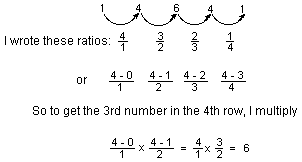
Note: The previous links/images became invalid. I found another copy of it online and have changed the links.
Pascal's Triangle and Prime Numbers
We start off using a basic Pascal Triangle....If you aren't familiar with how it is constructed, the rules are quite simple... A) anywhere that is blue here is considered "0". B) Start with a "1" at the top. C) For each spot, simply add the two spots above it.
Now that we have the numbers, the next step is to mod them. If you are unfamiliar with "mod", think of it as "the remainder after division"... Thus, 10 mod 3 is 1 (10/3 = 3r1) and 10 mod 2 is 0 (10/2=5r0).
To simplify matters, all we care about is when the remainder is 0. For example, in this version of our Pascal's Triangle, we color coded in a darker blue anything that has a remainder other than 0. Anotherwords, the ones NOT colored in are MULTIPLES of 2.One thing you will notice is that it is a fractal (known as Sierpinski's Gasket)... Basically, we have a 2x2 (2 high, 2 wide at base) triangle colored in... Then we repeat by adding 2 of those triangles to the bottom. So, in this example, the original triangle has 1 on row#0 and 1,1 on row#1. The two repeats are row#2 and row#3, and incidentally both contain the numbers 1 on row#2 and 1,3 (or 3,1) on row#3. The second copy is a mirror of the first.
 Then, grab everything (original and two copies) and copy them as a group [thus the fractal] two more times.
The mod3 version (colored in red for NON-multiples of 3) shown here is similar with a slight difference. In this case, the original is 3x3.
But the real tricky part is the copying/cloning... While the first two clones (1/ 1,4 / 1,6,10) must seem like the exact same pattern as before, notice that we now make 3 more copies in the next couple rows BEFORE we group and clone.
This can be easily understood. Look back at the original triangle in mod2. Notice one entry in first row, and two entries in the second? When we clone it, we clone the one at the top twice beneath it.
Now look at the original triangle in mod3. The original has one in the top row, two in the second, and three in the third. We copy the original top one twice into our second set of rows, and three times in the third set of rows... THEN we group and repeat.
Let's take a look at another aspect... Notice the upside down "empty" triangles in the middle? For example, on mod2, row#8 through row#14? Well, what you will actually see is that at 21, 22 and 23 that only the edge "1"s are colored in... That is because those rows are POWERS of 2. Similarly you see the same on 31 and 32 ( further isn't shown in this image )... This will actually become very important soon.
 Now, let's consider what happens when we overlay them... I like to think of this like transparencies in elementary school (actually, I even bought some transparencies for this very purpose)...
The first thing you will likely notice is that some of those show blue, some show red, some show a purplish mix.
The blue ones are NOT multiples of 3 (cuz they show blue) but ARE multiples of 2 (because it would have been clear/empty on the mod2 chart).
The red ones would be multiples of 2 but NOT multiples of 3, for the same reason.
The purple ones are not multiples of 2 OR 3.
The clear/empty ones are therefore both multiples of 2 AND 3.
Let's look at some of those numbers... In the first 9 rows (0-8) the only clear/empty ones are the number 6, which is incidentally the 2*3. Then we also see 36, 12, 120.... You get the picture...
So why is this important? Well, for a couple reasons...
First, it shows that all composite numbers are actually transparent overlays of their prime factors...
Second, and this one is important, is because it also shows us what those factors are :)
How? Well, let's take a PQ value of 6 for example. Sure, off the top of our head, we know it is 2*3, but let's LOOK at it. Specifically, let's look at the row#6...
| COLUMN | ||||||
|---|---|---|---|---|---|---|
| 0 | 1 | 2 | 3 | 4 | 5 | 6 |
| 1 | 6 | 15 | 20 | 15 | 6 | 1 |
| Now, what are those entries mod (2*3) [ie: mod6]? | ||||||
| 1 | 0 | 3 | 2 | 3 | 0 | 1 |
I'll do more on this later.
Subscribe to:
Posts (Atom)